
Getting started
Where can I find my diaries on Home?
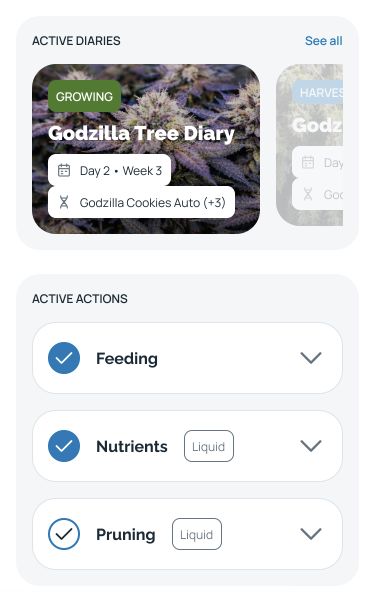
Find your diary cards in ACTIVE DIARIES on the HarvestED Home screen.
Your diary cards appear in ACTIVE DIARIES on the Home screen.
Start here
Open HarvestED and go to the Home screen.
Find your diary cards
Find ACTIVE DIARIES above ACTIVE ACTIONS. Each visible card shows a diary name, strain information, and a status such as GROWING or HARVESTED.
The See all control is to the right of the ACTIVE DIARIES heading.
What happens next
You can identify a diary by the name on its card. Viewing the cards does not change your diary.
If you are looking at other diaries
Check the section heading before choosing a diary.
View this article in the Help Center ↗
Need help with a different screen or app version? Tell our team