
Your grow diary
Where can I find the length, width, and height fields in a new diary?
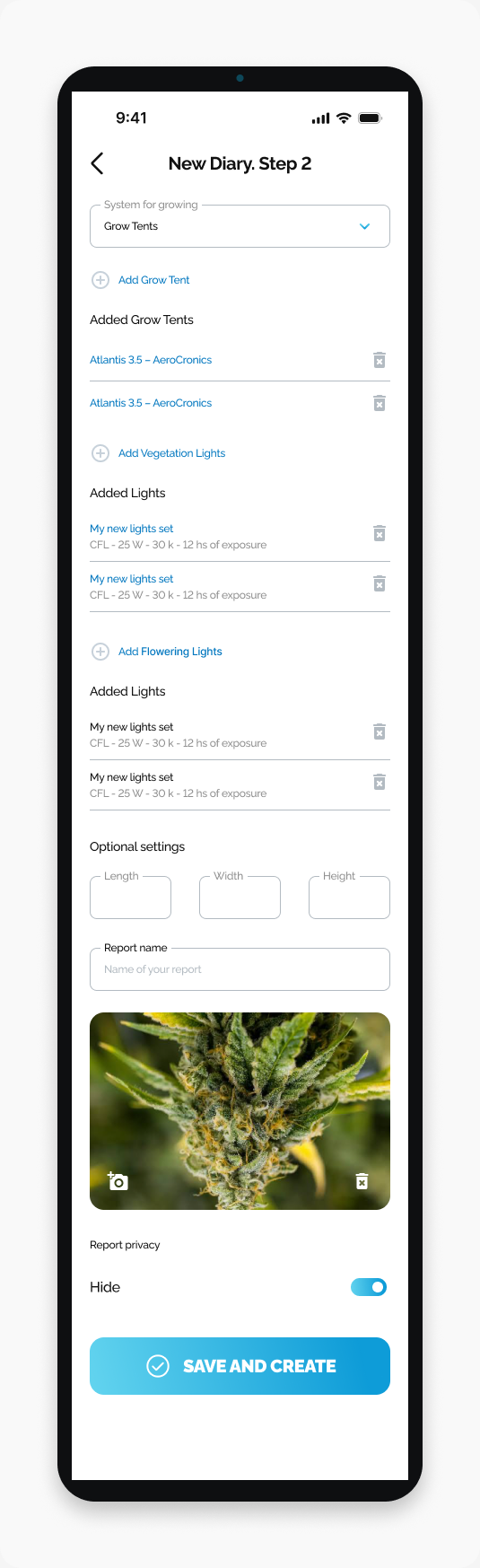
Locate the three dimension fields under Optional settings on New Diary Step 2.
Find Length, Width, and Height under Optional settings on New Diary. Step 2.
Start here
Open HarvestED and go to New Diary. Step 2.
Find the dimension fields
Scroll past the lighting sections.
Find the Optional settings heading.
Look for the three fields labeled Length, Width, and Height.
The fields appear in one row, immediately above Report name.
What happens next
You have located the dimension fields in the diary creation form. This guide covers their location, not which measurements or units to enter.
If you cannot find the fields
Check the screen title: these fields are on New Diary. Step 2. If you can see Report name, look directly above it.
View this article in the Help Center ↗
Need help with a different screen or app version? Tell our team