
Your grow diary
Where can I find the lighting settings in a new diary?
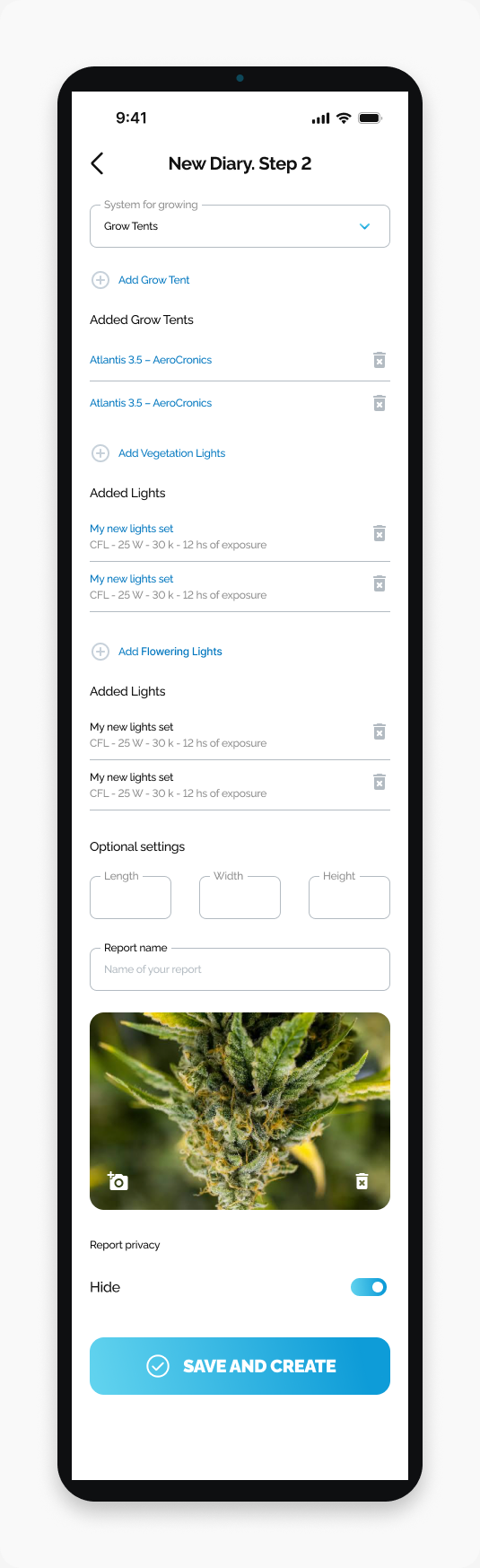
Find the separate vegetation and flowering light sections on New Diary Step 2.
The lighting settings are on New Diary. Step 2, below the grow tent section. Vegetation lights and flowering lights have separate sections.
Start here
Open HarvestED and go to New Diary. Step 2.
Find your lighting setup
Scroll below Added Grow Tents.
Find Add Vegetation Lights and the Added Lights list beneath it.
Scroll farther down to Add Flowering Lights and its separate Added Lights list.
Each listed light has a name and a details line. The names and values in the screenshot are examples, not lighting recommendations.
What happens next
You can review the two lighting lists while completing your diary setup. This guide covers finding the sections, not adding or changing a light.
If you see two Added Lights headings
Use the label above each list to identify it: Add Vegetation Lights for the first list and Add Flowering Lights for the second. Both appear above Optional settings.
Need help with a different screen or app version? Tell our team