
Learning and tools
How do I filter courses?
Apply a course category and return to All categories.
Open Academy to reach Grow Academy.
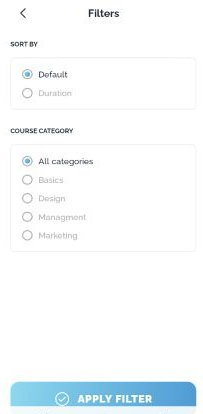
Open FILTER and select a course category. For example, choose Design.
Tap APPLY FILTER.
Review the result. If no courses match, the page can show No courses yet.
To remove the category restriction, reopen Filters, select All categories, and tap APPLY FILTER.
Reopening Filters also lets you check the selected category.
View this article in the Help Center ↗
Need help with a different screen or app version? Tell our team