
Actions and reminders
Add your first action
Choose a diary, action type and date on the Android New Action screen.
Create an action for a diary from the New Action screen. Select the diary, action type, and date before submitting it.
Before you start
You need a diary to attach the action to. This guide begins on New Action.
Create the action
Select a diary in Diary.
Select a Type of action.
Choose the date in Set date.
Enter a Description.
Complete the fields shown for the selected action type.
Tap CREATE ACTION.
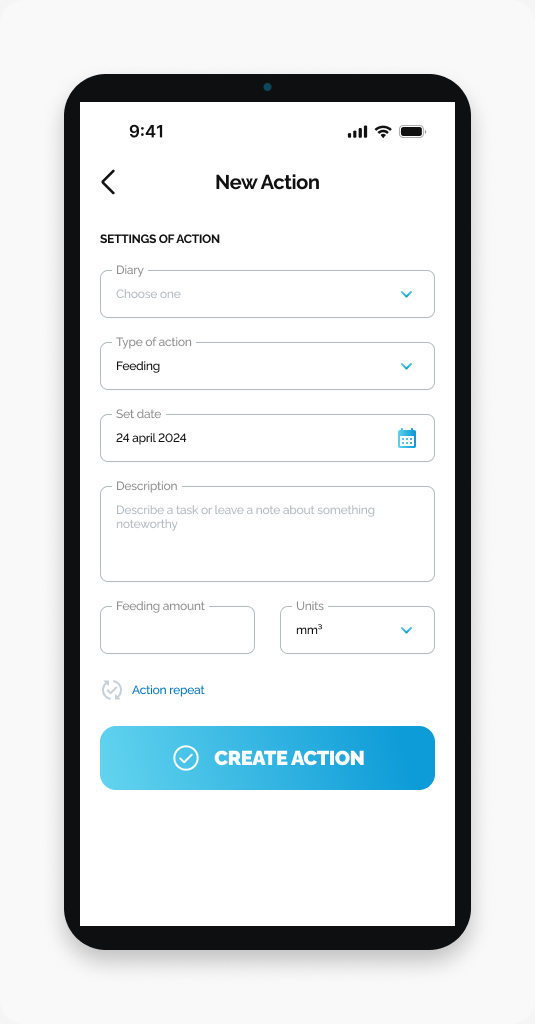
The screenshot shows Feeding. Other action types may show different fields.
What happens next
The action is submitted for the selected diary.
If you cannot create the action
Check the selected diary and action type, then read any message shown by the app.
Frequently asked questions
Do I need a diary before creating an action?
Yes. Choose the diary the action belongs to in the Diary field.
Where do I add a note?
Use Description on the New Action screen to add details about the action.
Where do I choose the date?
Use Set date before tapping CREATE ACTION.
Why do my fields look different from the screenshot?
The screenshot shows Feeding. The fields can vary with the Type of action you select.
Need help with a different screen or app version? Tell our team