
Your grow diary
Where can I find the watering settings in a new diary?
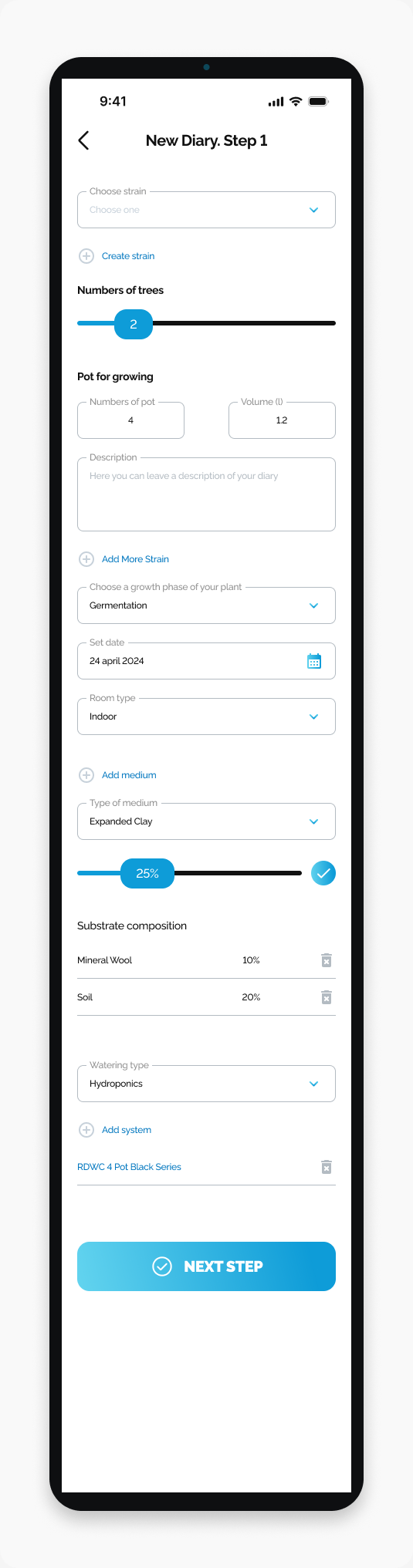
Locate Watering type and the system section on New Diary Step 1.
Find Watering type near the bottom of New Diary. Step 1, below the substrate composition section.
Start here
Open HarvestED and go to New Diary. Step 1.
Find the watering section
Scroll below Substrate composition.
Find the Watering type field.
Look below it for Add system and any listed system name.
The screenshot shows Hydroponics and a named system as examples. This section describes the diary setup; it is not a watering log or a reminder schedule.
What happens next
You can review the watering setup alongside the other details in your new diary form. This guide only covers where the section is located.
If you cannot find the settings
Check that you are on New Diary. Step 1, not New Action. The watering section appears above NEXT STEP.
Need help with a different screen or app version? Tell our team