
Your grow diary
Where can I review the substrate composition in a new diary?
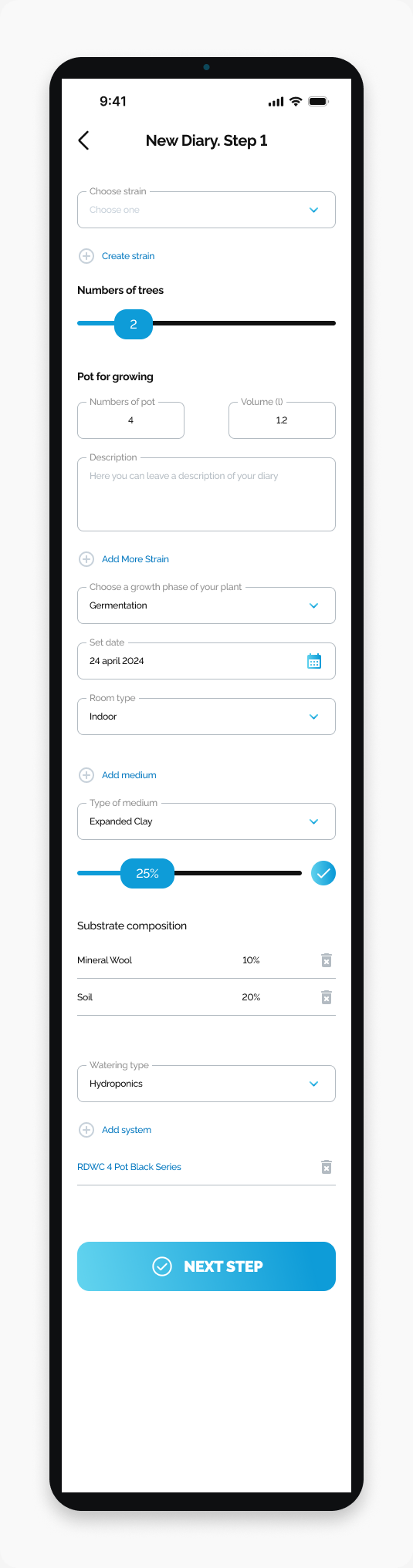
Find the Substrate composition list on New Diary Step 1.
Review the listed materials and percentages under Substrate composition on New Diary. Step 1.
Start here
Open HarvestED and go to New Diary. Step 1.
Find the composition list
Scroll below Room type to the medium section.
Find the Substrate composition heading below Type of medium and the percentage control.
Review the material names and percentages listed under that heading.
The selected value in Type of medium and the list under Substrate composition are separate parts of the form. The screenshot shows example values, not recommendations.
What happens next
You can review the composition while completing your diary setup. This guide only covers locating and reading the list.
If you cannot find the list
Check that the screen title is New Diary. Step 1. Scroll farther down past Room type; the composition section is above Watering type.
Need help with a different screen or app version? Tell our team